This section describes how batch import information about resources such as servers, platforms, and databases to RDA.

Currently, only information of server resources can be imported in batches.
Prerequisites
- You have configured a license by referring to License Configuration.
- You have added credentials by referring to Credential Management.
- You have installed the server collector by referring to Plugin Management.
Procedure
- Double-click the RDA icon on the desktop or RDA.exe in the installation directory to start the RDA client. Enter the username and password to log in to the RDA console.
- In the navigation pane on the left, choose Discovery > Servers.
- Click Import Resources in the upper right corner of the page.Figure 1 Importing resources

- Click Serverstemplate and set template parameters by referring to Table 1.
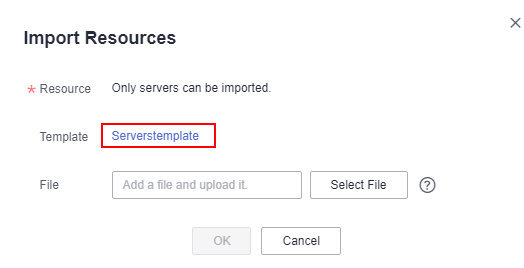
Table 1 Parameters Sheet
Parameter
Description
Server Info
Server Name
Custom server name
Server OS Type
Server OS
Server IP
Server IP address
Credential Id
Name for the credential for logging in to the server
Username
Username for logging in to the server
Password
Password for logging in to the server
Port
Port
- Click Select File to import the filled template and click OK.
- After the information is imported, view the credential binding status and resource discovery status of the related resources in the server list.
After the information is imported, the system automatically checks the credential binding status and discovers the resources.
Follow-Up Operations
After the resource information is imported, you can perform the following operations:
The following uses server resources as an example.
- Viewing the discovery results
In the server list, locate a server and view the status icon in the Status column.
- If the icon is
 , the discovery succeeds.
 - If the icon is
 , the discovery fails.
- If the icon is
- Viewing the cause of a discovery failure
Hover over
 and view the failure cause.
 - Modifying the credential information or access IP address
If the cause of a discovery failure is that the username or password is incorrect or the IP address does not match the username or password, the bound credential or access IP address is incorrect. You can perform the following steps to modify it:
- Locate the server and click Modify in the Operation column.

- Modify the IP address or click Add Credential and configure the parameters, and click OK. For details, see 4.
- Locate the server and click Modify in the Operation column.
- Rediscovering a server
After handling the discovery failure, select the server and choose Actions > Rediscover in the upper left corner to rediscover the server.
