This section describes how to discover database resources using RDA.
Table 1 lists the MongoDB database specifications that can be collected for each cloud platform. √ indicates that an item is supported, and × indicates that an item is not supported.
Platform |
Type |
Supported or Not |
|---|---|---|
Tencent Cloud |
Replica set |
√ |
Sharded cluster |
√ |
|
Alibaba Cloud |
Single-node instance |
× |
Multi-node replica set |
√ |
|
Sharded cluster |
√ |
|
Huawei Cloud |
Replica set |
√ |
Sharded cluster |
√ |
|
Ucloud |
Replica set |
√ |
Sharded cluster |
√ |
|
AWS |
Instance-based cluster (replica set) |
√ |
Elastic cluster (sharded) |
√ |
|
On-premises |
Single-node instance |
× |
Replica set |
√ |
|
Sharded cluster |
√ |
Prerequisites
- You have configured a license by referring to License Configuration.
- You have added credentials by referring to Credential Management.
- You have installed the database collector by referring to Plugin Management.
Procedure
- Double-click the RDA icon on the desktop or RDA.exe in the installation directory to start the RDA client. Enter the username and password to log in to the RDA console.
- In the navigation pane on the left, choose Discovery > Databases.
- Choose Actions > Add in the upper left corner of the page.Figure 1 Adding a database
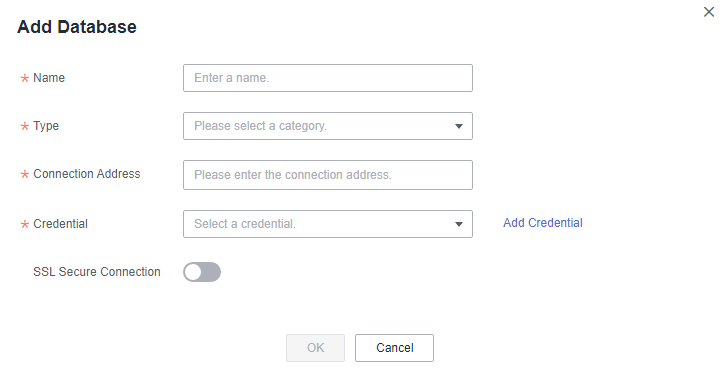
- Enter the required information by referring to Table 2.
If no credentials are added in advance, click Add Credential. In the expanded area, enter the credential name, username, and password. Then click Save Credential. To learn how to add a credential, see Credential Management.
Determine whether to enable SSL Secure Connection and click OK.Table 2 Parameters Parameter
Description
Name
Enter a name.
Resource Type
Set this parameter based on the actual database type.
Connection Address
Enter the connection access in format of IP address:port or enter the domain name. Example: 192.0.0.1:3306
Credential Name
Enter a credential name.
Username
Enter the username for logging in to the database.
Password
Enter the password for logging in to the database.

View the added database in the list. The system automatically checks the credential binding status and discovers the database resources.
Follow-Up Operations
After a database is added to RDA, you can perform the following operations:
- Viewing the discovery results
In the database list, locate a database and view the status icon in the Status column.
- If the icon is
 , the resource discovery is successful. You can click the database name to view the collected database details.
 - If the icon is
 , the resource discovery fails.
- If the icon is
- Viewing the cause of a discovery failure
Hover over
 in the database status column and view the failure cause.
 - Associating a credential to databases in a batch
If multiple databases use the same credential, you can associate the credential to these databases at the same time.
- In the database list, select the databases to be associated with the same credential and click Associate Credential.
- Select an existing credential or click Add Credential to create one. Enter the credential name, username, and password, and save the credential. Then click OK.
- Modifying the credential information or access IP address
If the cause of a discovery failure is that the username or password is incorrect or the IP address does not match the username or password, the bound credential or access IP address is incorrect. You can perform the following steps to modify it:
- Locate the database and click Modify in the Operation column.
- Modify the IP address or click Add Credential and configure the parameters, and click OK.
- Rediscovering a database
After handling the discovery failure, select the database and choose Actions > Rediscover in the upper left corner to rediscover the database.
- Adding a tag
If you add multiple databases to RDA, you can tag them for more efficient management and search.
- Select the database to which you want to add a tag and click Actions > Manage Tags.
- Select one or more tags. A tag value can be empty.
If no tags meet your requirements, click
 and create a tag by referring to Tag Management.
- Quick search
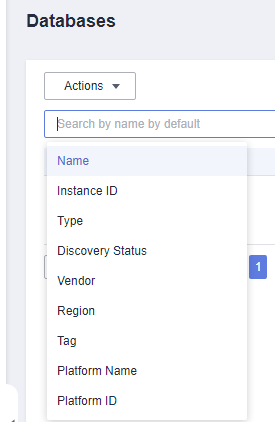
On the Databases page, you can enter search criteria in the search box to quickly search for middleware resources.