Prerequisites
- You have made preparations by referring to Preparing for Migration.
- You have started the OMS plugin by referring to Starting the OMS Plugin.
- You have created execution nodes by referring to Creating Execution Nodes.
Procedure
- Double-click the RDA icon on the desktop or RDA.exe in the installation directory to start the RDA client. Enter the username and password to log in to the RDA console.
- In the navigation pane on the left, choose OMS > Migration > Storage Migration.
- On the Storage Migration page, click Create Task.
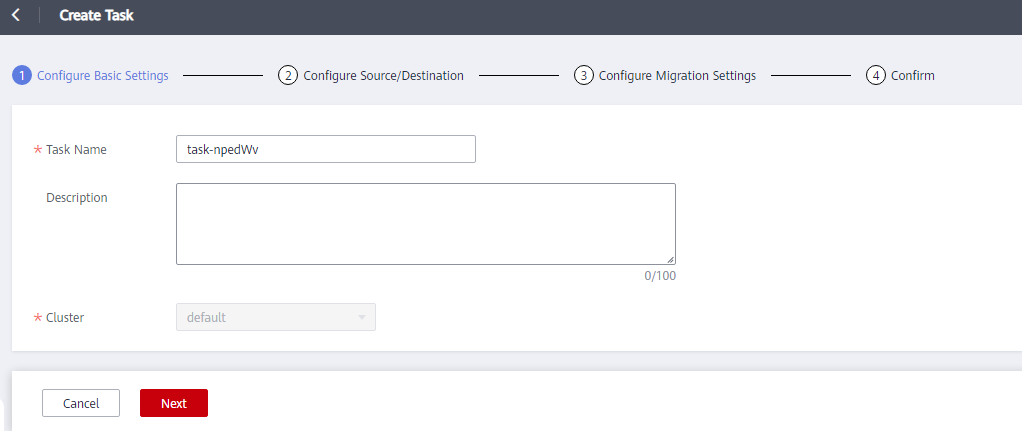
- Set basic parameters by referring to Table 1 and click Next.
- Configure the source and destination by referring to Table 2 and click Next.
Table 2 Configuring the source and destination Parameter
Description
Source
Select Huawei Cloud OBS, Alibaba Cloud OSS, Baidu Cloud BOS, Tencent Cloud COS, Kingsoft Cloud KS3, Qiniu Cloud Kodo, NAS, Google Cloud Storage, UCloud S3, Amazon S3, Azure Blob Storage, ECloud EOS, or HTTP/HTTPS data sources.
Destination
Select NAS or Huawei Cloud OBS.
NOTE:If Huawei Cloud OBS is used as the destination, the storage class of buckets can only be Standard or Infrequent Access. After the migration is complete, you can change the storage class of destination buckets.
Protocol
Select NFS_V3 or SMB.
Address
Enter the mount address of a file system.
The format is IP address:/xxx, for example, 192.1.1.1:/0001.
Path
- Enter the path to be migrated.
- Enter the path for receiving migrated files.
The format is /folder name.
Access Key ID
Enter the access key ID (AK) for accessing the bucket.
Secret Access Key
Enter the secret access key (SK) for accessing the bucket.
CAUTION:Do not use temporary AK/SK pairs.
Endpoint
Enter the endpoint of the region where the bucket is located.
NOTE:If the migration source is OBS, you can view the endpoint in the OBS bucket overview.
Key in JSON
Specify the key for accessing Google Cloud Storage. This parameter is available when you select Google Cloud Storage for Source. For details about how to obtain the key, see How Do I Obtain the Key in JSON of a Google Cloud Account?.
Bucket
Select the bucket name after you click List Buckets on the right.
Prefix
Specify a prefix to objects migrated to the destination bucket. For example, if the path of a source object is /A/B/C.txt and the specified prefix is /D, after the object is migrated, its path will change to /D/A/B/C.txt in the destination.
Authentication
This option is available if both the source and destination are NAS and the SMB protocol is selected for them. If this option is selected, specify Account, Password, and Domain to access the SMB folders in the source and destination. Ensure the account has the required permissions. If no authentication credential is required, do not select this option.
- Configure migration settings by referring to Table 3, Table 4, and Table 5. Then click Next. Confirm the configuration and click Start to start the migration.
Table 3 Source Configuration Parameter
Description
Constraint
Migration Method
- If this parameter is not configured, all files in the specified source will be migrated.
- If the source is NAS, the migration method Object list is available. If the migration source is OBS, migration methods Object list and Object name/prefix are available.
- Object name/prefix: Enter a specific prefix, and click Add to add the prefix to the prefix list. After the prefix is added successfully, all objects whose names start with the prefix in the source bucket will be migrated. You cannot add a prefix that is similar to but shorter than or the same as an added prefix.
- Object list: Place the object list file in an OBS bucket, and enter the directory address of the object list file in the text box. The address verification rule is: ^(((?![.]/)[^\"'<>&\\\\])*[/]|[/]|)$
Restrictions on an object list file vary with the destination type.
- Destination: Huawei Cloud OBS
- An object list file cannot exceed 30 MB.
- An object list file must be a .txt file, and the Content-Type metadata must be text/plain.
- An object list file must be in UTF-8 without BOM.
- Each line in an object list file can contain only one object name, and the object name must be URL encoded.
- The row length of an object list file cannot exceed 16 KB, or the migration will fail.
- The Content-Encoding metadata of an object list file must be left empty, or the migration will fail.
- The number of rows in an object list file cannot exceed 10,000.
- Destination: NAS
- An object list file cannot exceed 30 MB.
- An object list file must be a .txt file.
- An object list file must be in UTF-8 without BOM.
- Each line in an object list file can contain only one object name, and the object name must be URL encoded.
- The row length of an object list file cannot exceed 16 KB, or the migration will fail.
- The number of rows in an object list file cannot exceed 10,000.
Migrate Metadata
Determine whether to migrate metadata.
Archive Data Restoration
Archive and deep archive objects to be migrated must be restored first. If you select this option, the system will restore archive and deep archive objects to be migrated before migrating them. Restored objects will be migrated first.
For details about archive data restoration, see What Is Archive Data Restoration?.
Table 4 Advanced options Parameter
Description
Max. Concurrent Subtasks
The value cannot exceed the number of online migration nodes multiplied by 5. For example, if the number of online migration nodes is 2, the maximum number of subtasks can be 10 or any number below.
Overwrite Options
- Always overwrite: Files with the same names in the destination will always be overwritten.
- Conditionally overwrite: Files with the same names in the destination will be overwritten if they are older or have different sizes.
- Never overwrite: Files with the same names in the destination will never be overwritten.
Storage Class
Choose the object storage class for Huawei Cloud destination buckets. For details about storage classes, see How Do I Choose Storage Classes?.
Rate Limiting
Set the migration speed limit of the task in a certain period.
NOTICE:- The rate limit ranges from 1 MB to 1,024 GB.
- When creating multiple rate limiting rules, ensure that the time periods do not overlap.
For example, if there is a rule configure for the period from 8:00 to 12:00, you cannot configure rules for any overlapped periods, such as from 7:00 to 13:00, 7:00 to 8:00, and 9:00 to 12:00.
- The start time cannot be later than the end time.
For example, the time period from 23:00 to 01:00 is not allowed.
The following table lists example pattern rules for different scenarios.
Scenario
Example Pattern
NAS
Object Storage
Description
Level-1 directory path
test
/test
test
xx can be an expression containing asterisks (*) and question marks (?).
File paths that end with xx
**xx
/xx /**xx
xx/**xx
Files whose names start with xx at the first layer in the root path
/xx*
/testssss matched
/test/xx not matched
/testssss matched
/test/xx not matched
File paths that start with xx
/xx**
/xx/**
/xx**
/xx/**
xx**
xx/**
Files whose names contain xx
**xx*
**xx*
**xx*
File paths that contain xx
**xx**
**xx**
**xx**
File paths that start with xx and end with yy.
/xx**yy
/xx**yy
xx**yy
xx and yy can be expressions containing asterisks (*) and question marks (?).
File paths that end with xx or yy
**{xx,yy}
**{xx,yy}
**{xx,yy}
Files whose names contain xx or yy
**{xx,yy}*
**{xx,yy}*
**{xx,yy}*
Files paths that contain xx or yy
**{xx,yy}**
**{xx,yy}**
**{xx,yy}**