Scenarios
RDA is used for resource discovery, resource collection, and cloud solution design.

The collected resource specifications and performance data and evaluation results are stored in your local disk or database.
Prerequisites
You have installed RDA by referring to Installing RDA.
Procedure
- Double-click the RDA icon on the desktop or RDA.exe in the installation directory to start the RDA client. Enter the username and password to log in to the RDA console. Read the information security and privacy agreement carefully.
- Upon the first login, you need to configure a license or apply for a trial.
- Applying for free trial
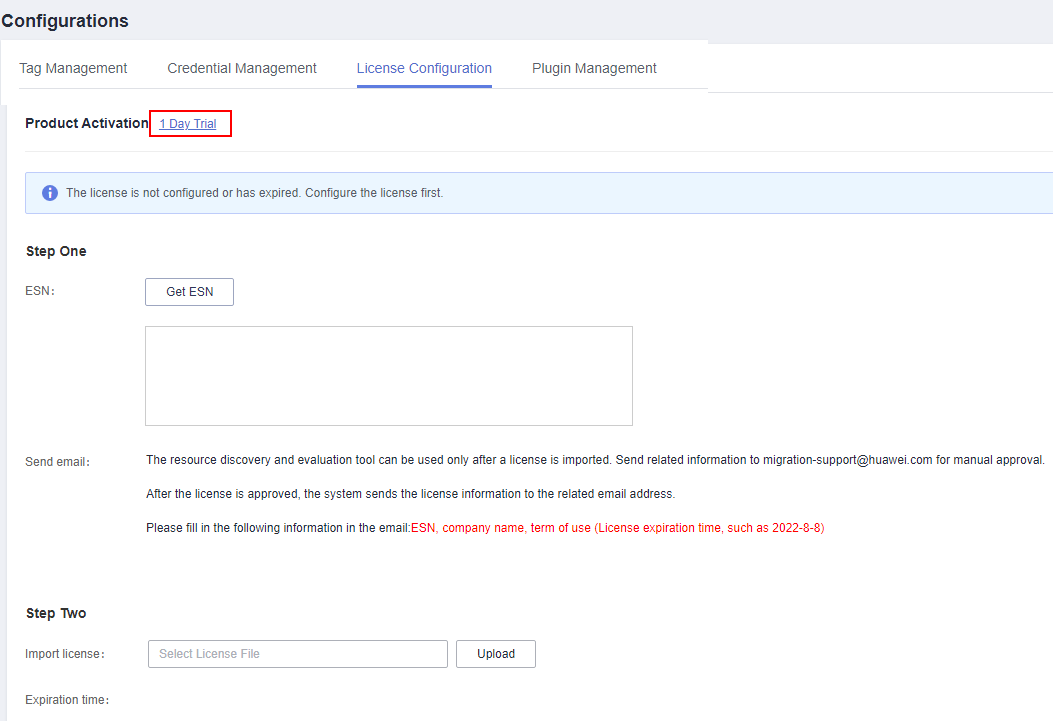
- In the left navigation pane, choose Configurations. On the License Configuration tab page, click One-day free trial next to Production Activation.Figure 1 Applying for free trial
- Enter the company name and remarks, and click OK to submit the application.

Before applying for free trial, ensure that your server can connect to the Internet.
- In the left navigation pane, choose Configurations. On the License Configuration tab page, click One-day free trial next to Production Activation.
- Configuring the license
- In the left navigation pane, choose Configurations. On the License Configuration tab page, click Get ESN next to ESN and send the obtained ESN to migration-support@huawei.com for approval. After the application is approved, you will receive a license file by email.
- Click Upload next to the Import License box to import the obtained license file.
- Applying for free trial
- Install the resource collector.
Before discovering resources, you need to install the corresponding resource collector.
- In the navigation pane on the left, choose Configurations.
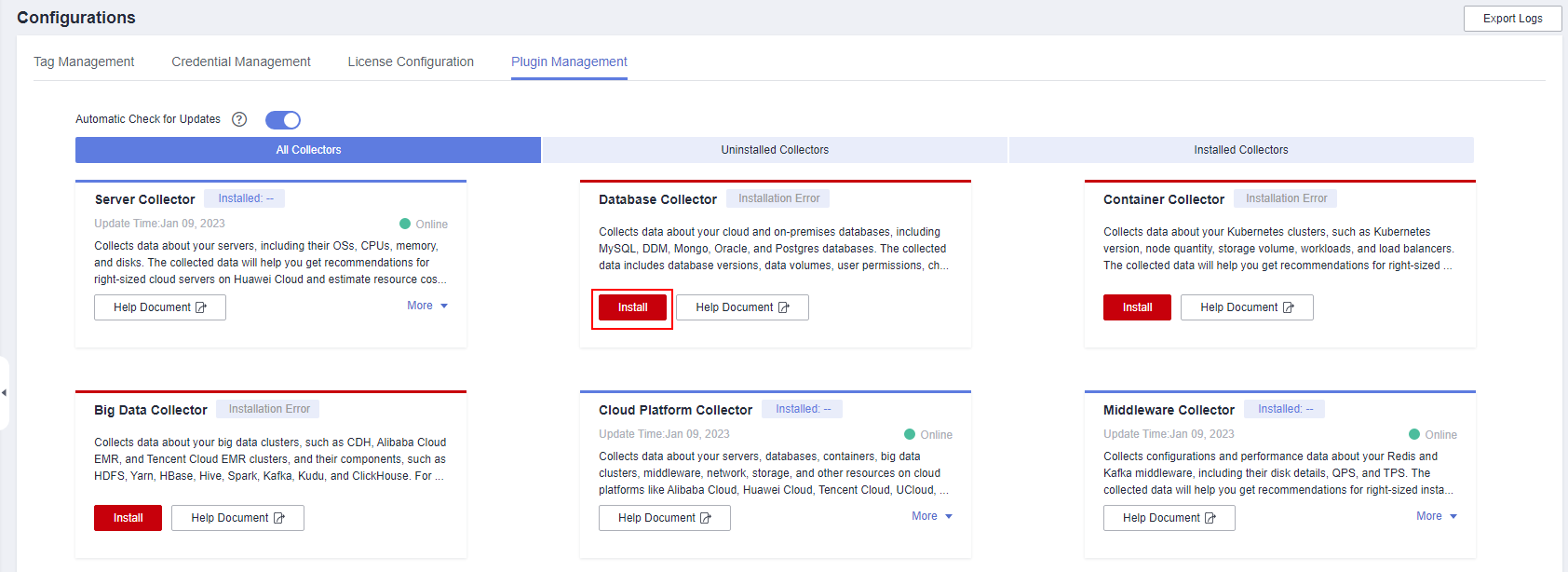
- On the Plugin Management tab page, locate the resource collector you need and click Install.Figure 2 Installing a plugin
- Add the platform information.If you want to use RDA to discover your server resources, go to 5.
- In the navigation pane on the left, choose Discovery > Platforms. On the platform list page, choose Actions > Add in the upper left corner.Figure 3 Adding the platform information
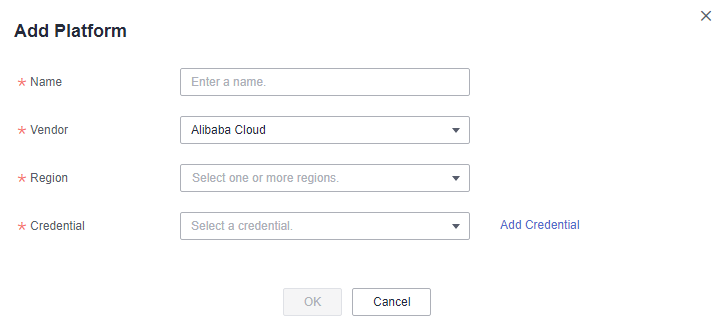
- Enter the required information by referring to Table 1.If no credentials are added in advance, click Add Credential next to the Credential box. In the expanded area, enter the credential name, AK, and SK, and click Save Credential. Then click OK. To learn how to add a credential, see Credential Management.
Table 1 Parameters Parameter
Description
Name
User-defined
Type
Select the source cloud platform.
Region
Select the regions where you want RDA to discover resources.
Credential Name
User-defined
AK
Enter the AK for accessing the source cloud platform.
SK
Enter the SK for accessing the source cloud platform.
View the added platform in the list. The system automatically checks the credential binding status and discovers resources on the platform.
- In the navigation pane on the left, choose Discovery > Platforms. On the platform list page, choose Actions > Add in the upper left corner.
- Add the server information.
- In the navigation pane on the left, choose Discovery > Servers. On the server list page, choose Actions > Add in the upper left corner.Figure 4 Adding a server
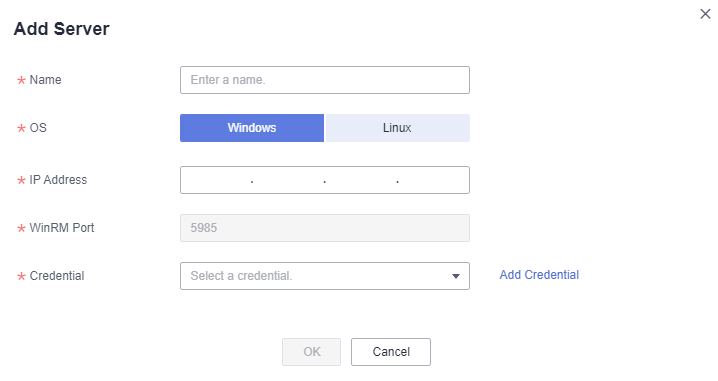
- Enter the required information by referring to Table 2.If no credentials are added in advance, click Add Credential next to the Credential box. In the expanded area, enter the credential name, and username and password, and click Save Credential. Then click OK.
Table 2 Parameters Parameter
Description
Name
User-defined
System Type
Set this parameter based on the actual system type.
NOTE:If the RDA for Linux was installed, Windows servers cannot be collected.
IP Address
Enter the IP address of the server to be discovered.
Credential Name
User-defined
Account
The account for logging in to the server.
Password
The password for logging in to the server.
View the added server in the list. The system automatically checks the credential binding status and discovers the server.
- In the navigation pane on the left, choose Discovery > Servers. On the server list page, choose Actions > Add in the upper left corner.