Scenarios
Before using SMS, you need to download and install the OMS plug-in.
Prerequisites
You have bound a cloud account to the cloud environment by referring to Cloud Environment Configuration and Cloud Account Configuration.
Procedure
- Double-click the RDA icon on the desktop or RDA.exe in the installation directory to start the RDA client. Enter the username and password to log in to the RDA console.
- In the navigation pane on the left, choose Plugin Management.
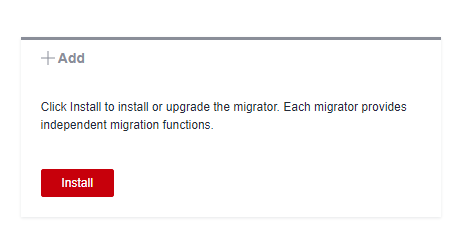
- Click Install in the Add pane under Migrators.
- Select an installation method.
- Download and install: Locate the latest OMS plug-in installation package, and click Download in the Operation column to download the installation package to the RDA installation directory, for example, C:\RDA.
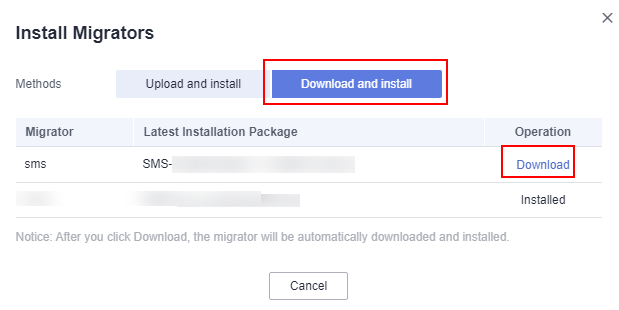

The SMS installation package is downloaded from an OBS bucket on Huawei Cloud over the Internet. The domain name of the OBS bucket is rda-collector.obs.cn-north-4.myhuawecloud.com.
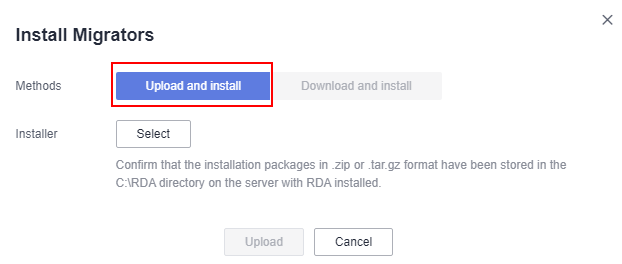
- Upload and install: Click Select to upload the SMS plug-in installation package. Ensure that the SMS plug-in installation package has been stored in the C:\RDA directory of the server where RDA is installed.
- Download and install: Locate the latest OMS plug-in installation package, and click Download in the Operation column to download the installation package to the RDA installation directory, for example, C:\RDA.
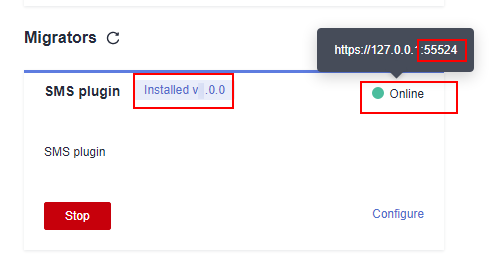
- Wait until the configuration is complete. Then click Start in the SMS plugin box. When the status changes from Ready to Online, the SMS plugin is started successfully.
You can hover the mouse pointer on Online to view the startup port of the SMS plugin.

- If the cloud account information is modified after the SMS plugin is started, restart the SMS plugin.
- Restarting the RDA or SMS plugin may change the startup port.