Creating a Scheduled Task
- On the ECS, choose Control Panel > System and Security > Administrative Tools > Task Scheduler.
- On the Task Scheduler page, click Task Scheduler Library and click Create Task on the right.
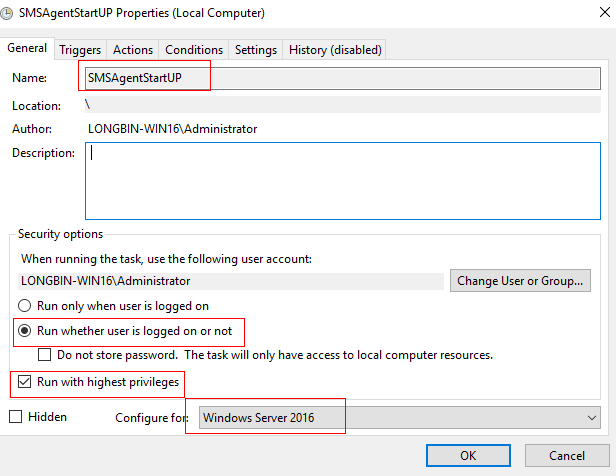
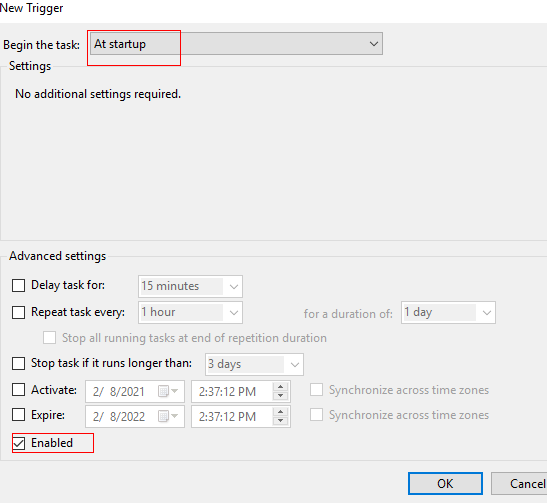
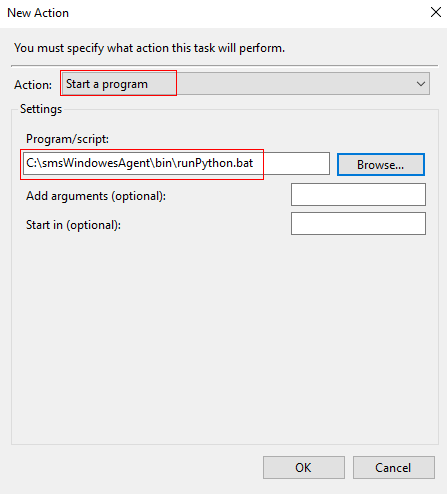
- Disable Cloud-Init to prevent the password from being changed. During the execution of the scheduled task, the ECS login password cannot be changed, or the task will become invalid.
Default password: SMt@3H! gg5T$
You need to specify a valid password as needed when preparing the ECS.
Opening Ports 8899 and 8900
netsh advfirewall firewall add rule name=peagent dir=in action=allow protocol=TCP localport=8899
netsh advfirewall firewall add rule name=ntcldst dir=in action=allow protocol=TCP localport=8900
Opening Port 1688 and Configuring KMS Server IP Address
netsh advfirewall firewall add rule name=kms dir=out action=allow protocol=TCP localport=1688
slmgr -skms 100.125.1.2
slmgr –ato
Replace the IP address in the command above with that of the KMS server you use.
Disabling Remote Login
The ECS login password must remain unchanged. During migration, remote login needs to be disabled for account security. During the migration, it is not allowed to log in to target servers remotely, or the migration will fail. You need to remind customers of this risk. For security purposes, only allow traffic from the source servers.